
Understanding Heap File Storage

When you execute INSERT INTO users VALUES (1, 'Alice') in PostgreSQL, what actually happens on disk? Where does that data go? How is it organized? Why does a simple SELECTsometimes cause disk writes? These aren't just academic questions—they're the foundation for understanding everything from why VACUUM exists to how indexes work to why your queries might be slower than expected.
This module is about pulling back the curtain on PostgreSQL's storage engine. We're going to look at the raw bytes on disk, understand how pages are structured, and see exactly how tuples are laid out in memory. By the end, you'll be able to inspect pages with surgical precision and understand the physical reality behind every SQL operation.
Let's start at the very beginning: the heap.
What the heck is heap anyway ?
The term "heap" in database terminology doesn't mean anything fancy—it literally means "pile." When PostgreSQL stores your table data, it piles it up in no particular order. This is fundamentally different from how some other databases work, and understanding this difference is crucial.
Imagine you have a table called users with a primary key on id. In MySQL's InnoDB engine, the actual table data is physically sorted by that primary key. Insert a row with id=100, then id=50, then id=200, and InnoDB will rearrange them on disk to be in order: 50, 100, 200. The table itself is structured as a B-tree sorted by the primary key.
PostgreSQL doesn't do this. When you insert those same three rows, they go onto disk in exactly the order you inserted them: 100, 50, 200. The primary key index is separate—it's just another index that happens to enforce uniqueness. The table itself? Just a heap. A pile of tuples with no inherent order.
This design choice has profound implications. It makes inserts fast because there's no need to find the "right" place to put new data—just throw it wherever there's space. It makes updates more flexible because moving a row doesn't require reshuffling an entire tree structure. But it also means that scanning a table by primary key order requires random I/O, since the rows aren't physically sorted.

Where it is stored then ?
Postgres stores all of your data inside the directory pointed by $PGDATA environment variable. use the following command to see where it is in your case
echo $PGDATA
$PGDATA/base/{database_oid}/{relfilenode}
Experiment to find your table physical location
-- create demo table
CREATE TABLE test(
    id INT,
    data TEXT
);

-- find the filepath
SELECT pg_relation_filepath('test') as physical_location,
SELECT pg_relation_size('test') as size_in_bytes;
Output Interpretation
You might see something like base/16384/24601. This means your database has OID 16384, and this particular table has been assigned relfilenode 24601. If you navigate to $PGDATA/base/16384/, you'll find a file named 24601. That's your table. That file contains all the rows you've inserted, organized into 8KB chunks called pages.
Why 8KB? This is a configurable compile-time option, but 8192 bytes is the default, and there are good reasons for it. It's large enough to hold a reasonable number of rows (typically 50-200 for OLTP workloads) but small enough that reading a page from disk is a single, efficient I/O operation. It aligns well with operating system page sizes, which reduces translation lookaside buffer (TLB) misses and makes memory management more efficient. It's been the default for decades because it represents a good compromise for mixed workloads.
Each table file can grow up to 1GB. Once it exceeds that size, PostgreSQL creates a new segment file named 24601.1, then 24601.2, and so on. This segmentation has historical roots—old filesystems had strict file size limits—but it's still useful today for operational reasons. Smaller files are easier to copy, back up, and manage. They also allow for some parallelism in I/O operations.
File Organization on Disk
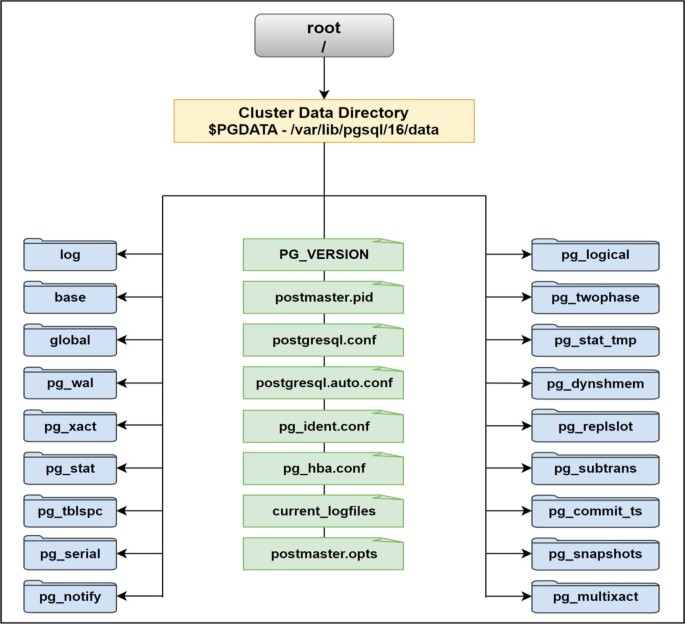
In the next blog we will briefly understand those files, tuple structure as well really indepth.